

Keep, label, redirect or remove? Decide what a sold, out-of-stock or expired listing URL should do from the item’s real state, then check it worked.
A phone sells out, a used car is sold, a flat is let. The page still gets visits, and Googlebot still asks for it.
One rule for all of them goes wrong somewhere. Decide each URL from what is actually true of the item.
The short version. Coming back: keep the page and say when. Gone but still looked up: keep it, labelled. Replaced by the same thing: 301 to the replacement. Gone with nothing to offer: 404 or 410, and take it out of links and sitemaps.
Decide from the item’s real state
| Real state | Status code | What the page shows | Alternatives and internal links | Sitemap |
|---|---|---|---|---|
| 1. Temporarily unavailable Restock due, flat back on the market soon | 200 | A clear “Out of stock” or “Let until…” message, a restock date if you know it, a disabled buy or enquire button. Structured data OutOfStock or BackOrder. | Show close alternatives on the page. Keep it in category links. | Keep |
| 2. Permanently discontinued Will never be sold again, still looked up for specs or parts | 200 | “Discontinued”, with the specs kept. Structured data Discontinued. No buy button. | Link to the current range and to compatible parts. Remove it from category grids and shopping feeds. | Keep while it earns search visits; otherwise treat as state 5 |
| 3. Sold, still useful to research A unique car or property people compare prices against | 200 | “Sold”, the date, and the details buyers compare. No contact form for the sold item. | Link to similar live listings and to the model or area page. Drop it from live search results on your site. | Keep while it earns search visits; otherwise treat as state 5 |
| 4. Replaced by an equivalent The same item relisted at a new URL, or a direct successor | 301 to the replacement | Nothing: visitors land on the replacement. | Point internal links and canonicals at the new URL. | Replace the old URL with the new one |
| 5. Removed, no meaningful replacement A one-off item with no search value left | 404 or 410 | A helpful not-found page: search, categories, contact. | Remove every internal link to it. | Remove |
Never redirect a removed item to the homepage or an unrelated category just to avoid an error. A redirect is for a page that genuinely replaces it.
What Google actually says
- All 4xx codes except 429 are treated the same. Google doesn’t index them, and removes indexed ones (Google). So 404 and 410 lead to the same result; pick 410 if you want your own records to say “removed on purpose”.
- “404 responses are not necessarily a problem” when a page is removed without replacement. Google cannot be told to forget a URL, but crawls it less and less often (Google).
- A 200 page that is empty or reads like an error can be reported as a soft 404 (Google). A sold listing stripped down to “no longer available” is exactly that: keep useful content, or return a real 404.
- A 301 is a strong signal that the target should be processed instead (Google). Use a permanent redirect only when it won’t be reverted (Google).
- A sitemap lists the URLs you want in search results (Google), not every URL you ever published.
Shops with product feeds
Google’s product markup has separate values for OutOfStock, BackOrder, SoldOut and Discontinued (Google). Merchant Center asks you to match the feed’s availability to the landing and checkout pages, and to delete permanently discontinued products from your data rather than mark them out of stock (Google). When only one colour or size sells out, handle it on the variant, not the product URL: see WooCommerce variations and SEO.
Example: one marketplace, five URLs
Illustrative example, not real data. An invented Kenyan classifieds site, example.co.ke, selling phones from shops, used cars and rentals. Evidence covers the last 28 days.
| URL | What is true | Evidence | Decision |
|---|---|---|---|
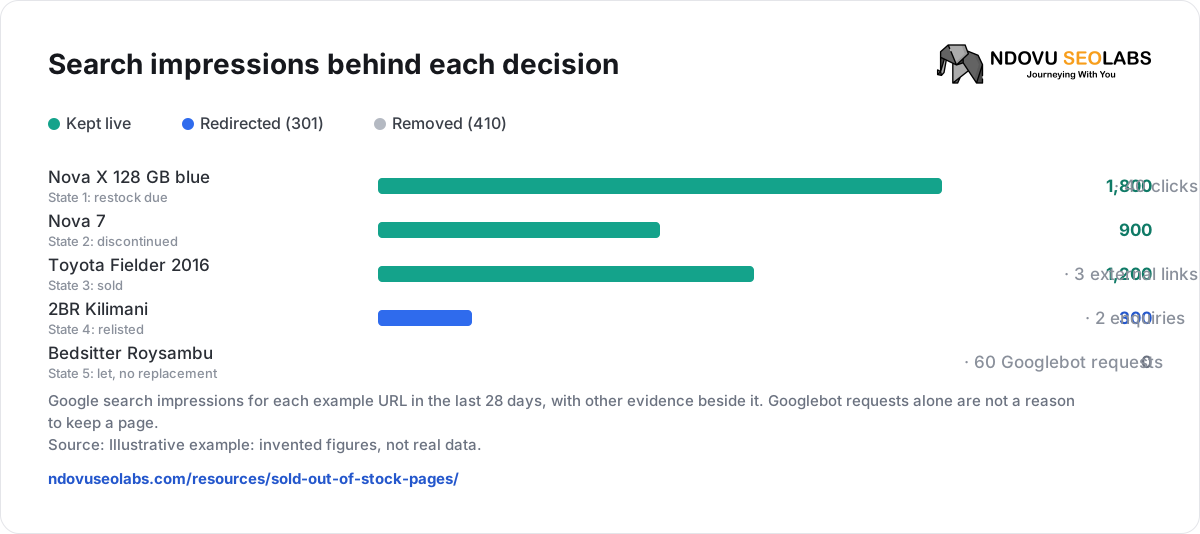
| /phones/nova-x-128gb-blue/ | Supplier restocks in two weeks. | 1,800 impressions, 40 clicks | State 1: keep at 200, “Back about 2 December”, show the 256 GB and black versions. |
| /phones/nova-7/ | Maker ended the model last year. | 900 impressions for battery and screen searches | State 2: keep, label “Discontinued”, link to Nova 7 batteries and the Nova range. Remove from the shopping feed. |
| /cars/listing/toyota-fielder-2016-ref-881/ | Sold last month. | 1,200 impressions for “fielder 2016 price”, 3 external links | State 3: keep, mark “Sold”, link to live Fielders and /cars/toyota/fielder/. |
| /rentals/2br-kilimani-ref-4412/ | Landlord relisted the same flat as ref-5120. | 300 impressions, 2 enquiries | State 4: 301 to /rentals/2br-kilimani-ref-5120/. Update the area page link. |
| /rentals/bedsitter-roysambu-ref-3907/ | Let; the landlord left the site. | No impressions, no external links, 60 Googlebot requests | State 5: 410, remove from the sitemap and the Roysambu page. |
Two pages that are “gone” stay live, because people still search for them. The flat with no search value goes, even though Googlebot still asks for it: those requests come from the links and sitemap entry you are about to remove.
Search impressions behind each decision


- Kept live
- Redirected (301)
- Removed (410)
Google search impressions for each example URL in the last 28 days, with other evidence beside it. Googlebot requests alone are not a reason to keep a page.
Source: Illustrative example: invented figures, not real data.
Gather the evidence in Ndovu
- Search Performance → Pages, with Filters → Page URL set to Contains your listing path (for example
/listing/), shows which sold or expired URLs still earn impressions and clicks. - Inspect URL puts one URL’s Google clicks, organic visits, crawler requests in 90 days and whether it can rank on one page (Indexing and Inspect URL).
- In Indexing, Has impressions (28 days) and Dropped out (impressions in the three months before, none in the last 28 days) separate pages still in use from pages already fading.
- In Crawl Analytics, Errors & blocks shows not-found responses (410 included), and Crawl issues raises “Search engines are hitting broken pages” and “Crawlers keep requesting outdated redirects” with the URLs behind them.
- A site audit flags the leftovers: Sitemap lists a broken URL, Sitemap lists a redirecting URL and Page with search traffic now redirects.
Check that it worked
| After you… | Evidence of progress | Where |
|---|---|---|
| Change status codes | Each URL answers the code you chose, with one redirect hop at most. | Bulk HTTP Status Checker (25 URLs at a time) |
| Clean links and sitemaps | No audit issue lists the removed or redirected URLs. A 410 that nothing links to shows as Retired page (410 Gone), an information item, not an error. | Audit issue reference |
| Remove pages | Not-found requests fall in Activity, Response set to 4xx client error. Some continue for a while: Google rechecks removed URLs less and less often. | Crawl Analytics |
| Redirect pages | The replacement picks up the old page’s queries (Movements: ranking page changed). Redirect requests to the old URL taper off. | Search Performance, Crawl Analytics |
| Keep labelled pages | They keep their impressions and Google still lists them as Indexed, not as a soft 404. | Indexing |
A worksheet you can copy
URL:
Real state (1 temporary / 2 discontinued / 3 sold, still researched / 4 replaced / 5 removed):
Evidence, last 28 days (impressions, clicks, external links, crawler requests):
Replacement URL (state 4 only):
Status code:
What the page shows:
Alternatives and links added or removed:
Sitemap and product feed:
Changed on (date):
Check on (date):
Result:| When you need to… | Read |
|---|---|
| Read Google’s verdict for each page | Indexing and Inspect URL |
| See what crawlers still request | Read Crawl Analytics |
| Handle sold-out variations | WooCommerce variations and SEO |
| Understand what indexing tools can and can’t do | Indexing is not a submission button |
Sources
- Google: How HTTP status codes affect Google’s crawlers
- Search Console: Page indexing report
- Google: Redirects and Google Search
- Google: Build and submit a sitemap
- Google: Product snippet structured data
- Merchant Center: Availability