

Read a Google Maps rank grid: what the summary hides, what each point shows, and how to repeat checks so later results compare fairly.
You search “phone screen repair” on Google Maps outside your shop and you are first. A customer three kilometres away searches the same thing and finds three other shops.
Both results are real. A rank grid shows where each one holds, so you can see how far your reach goes and what to look at next.
The short version. One search shows one place. A grid repeats the same search at points across your service area. Read the summary for the trend and the points for the reason, and repeat the check with the same keyword, grid, centre and timing so later results compare.
Why your rank changes across the city
Google says local results depend mainly on three things (Google):
| Factor | What Google says | What you can do about it |
|---|---|---|
| Relevance | How well a Business Profile matches what someone is searching for. | Complete and accurate profile details, categories and services. |
| Distance | How far each business is from the person searching. If they don’t share a location, Google uses what it knows about it. | Nothing, for one premises. It sets where you start strongest. |
| Prominence | How well-known a business is. Reviews and links from other websites count. | Reviews, replies, mentions and a useful website. |
Google also says there is no way to request or pay for a better local ranking. So a grid is a diagnostic, not a lever: it shows where distance wins and where relevance and prominence are not enough to carry you.
What a rank grid adds
A grid places points at a fixed spacing around your listing and runs the same Maps search as if from each one. Each point records your position and the businesses ranked there.
| Question | One search can answer it | A grid can answer it |
|---|---|---|
| Do I appear at my door? | Yes | Yes |
| How far does my top-three reach go? | No | Yes, point by point |
| Which side of town am I weak on? | No | Yes |
| Who beats me where I am weak? | Only at that spot | At every point |
| Is visibility improving across the area? | No | Yes, if the grid stays the same between checks |
A point is a simulated search. Real customers also get results shaped by their own location and history, so treat each point as evidence, not a promise of what everyone sees.
Example: a phone repair shop in Westlands
Illustrative example, not real data. An invented phone repair shop, Kifaa Fix (kifaafix.example.co.ke), with one shop in Westlands, Nairobi. Competitors are labelled A to D.
The check record
| Field | Value |
|---|---|
| Keyword | phone screen repair |
| Listing | Kifaa Fix, Westlands (the confirmed Google Maps listing) |
| Grid size and shape | 5×5 square, 25 points |
| Spacing | 2 km between points, 8 km edge to edge |
| Centre | The shop’s listing |
| Device | Mobile |
| Date and time | Tuesday 4 November 2026, 10:00 EAT |
| Summary | Average rank 9.6 · In the top 3: 6 of 25 (24%) · In the top 20: 22 of 25 |
Results per point
Your position at each point. “–” means not in the top 20. The centre cell is the shop.
| 4 km west | 2 km west | Centre | 2 km east | 4 km east | |
|---|---|---|---|---|---|
| 4 km north | 14 | 9 | 6 | 11 | – |
| 2 km north | 8 | 4 | 2 | 5 | 13 |
| Centre | 6 | 2 | 1 | 3 | 12 |
| 2 km south | 12 | 3 | 2 | 7 | 18 |
| 4 km south | – | 15 | 9 | 16 | – |
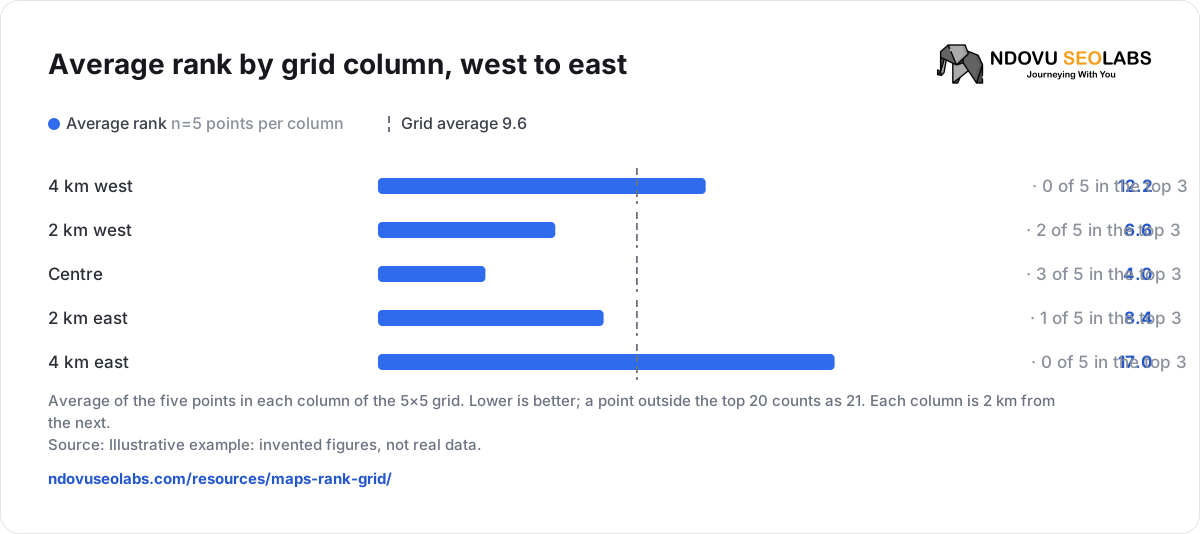
Average rank by grid column, west to east


- Average rank n=5 points per column
- Grid average 9.6
Average of the five points in each column of the 5×5 grid. Lower is better; a point outside the top 20 counts as 21. Each column is 2 km from the next.
Source: Illustrative example: invented figures, not real data.
Summary versus points
| What you read | What it says here | What it hides or adds |
|---|---|---|
| Average rank 9.6 | Mid-table on average. | That the shop is 1st to 3rd near the door and 12th to 18th on the east edge. |
| Top-3 coverage 24% | Six points out of 25 see the shop in the first three. | All six are in the middle ring, within about 3 km of the shop. Coverage is a radius, not a spread. |
| In the top 20: 22 of 25 | Found almost everywhere. | Three corners lose it entirely. |
| Point “2 km south, 2 km east” | Rank 7, against 3rd at “2 km south, 2 km west”. | Adds: Competitor A is first here, with far more reviews than Kifaa Fix. |
| Point “4 km east” | Rank 12. | Adds: Competitors B, C and D take the top three, all closer to that point. |
Reading: distance explains the outer ring. The east side is the useful finding: 2 km south-east of the shop it drops to 7th, while the matching point to the south-west holds 3rd. Competitor A wins there and has a stronger review profile. That points to prominence, so the next step is asking customers for reviews, replying to them, and comparing the two profiles’ categories and services.
Patterns and what to check next
| Pattern on the grid | Likely reading | Check next |
|---|---|---|
| Strong at the centre, fading evenly outwards | Distance, as expected. | Whether the grid is wider than the area you really serve. |
| Weak on one side only | A competitor is stronger there, or closer. | Open those points; compare reviews, categories and what the leader shows. |
| Weak even at the door | Relevance: the profile may not match the keyword. | Primary category, services and how the keyword appears on the profile and website. |
| Found nowhere for one keyword, fine for others | The listing does not match that search. | Whether you offer it and say so. |
| A sudden drop at every point | A listing or profile change, or a wider change in results. | Profile edits, suspensions and whether competitors moved too. |
Keep later checks comparable
A grid only shows progress if the next check asks the same question.
| Keep the same | Why |
|---|---|
| Keyword, word for word | “phone repair” and “phone screen repair” are different searches. |
| Grid size and spacing | A wider grid adds weaker outer points and lowers the averages. |
| Centre and listing | Moving the centre moves every point. Keep the confirmed listing. |
| Shape and skipped points | A circle drops the corners, which are usually the weakest points. |
| Device | A different device is a different check. |
| Day and time | Run checks at a similar time and weekday, so timing is not another difference. |
Write down any change you made to the profile or website, and its date, so you can line it up with the next check.
Run the grid in Ndovu
- Sidebar → Performance → Local SEO → Add Business. Find the listing and click Use this listing.
- Add keywords and choose the Area to check, for example City · 8 km wide · 25 points (a 5×5 grid 2 km apart). To set it yourself, use Settings → Grid → Edit grid: grid size, spacing in km, and shape.
- Click Check rankings (it shows the cost first; each point is a paid search per keyword), or set a weekly or monthly schedule.
- On Rankings, hover a point for its rank and click it for Results at this point: every business Maps returned there.
- Read Average rank, In the top 3 and In the top 20, then Ranking trends for history by check.
Average rank counts a point where you are not in the top 20 as 21. Share of voice scores #1 at a point as 100%, falling to 5% at #20. Changing the grid applies to future checks; saved checks keep the grid they were run with. The grid searches Google Maps; turn on Track the Local Pack in Settings to measure the Search results block too. Full steps are in Local SEO grids and Business Profile.
Check whether it worked
- Compare the same keyword and grid four to eight weeks after the change, at a similar time of day.
- Look at the points you targeted first, then the summary: the east side moving from 7th to 3rd matters more than a small change in average rank.
- Check the competitor at those points too. If everyone moved, the results changed, not just you.
- Line it up with Business Profile calls, direction requests and website visits. A better grid without more enquiries needs a different fix.
A grid record you can copy
Keyword (exact):
Listing (name, branch):
Grid size / shape / skipped points:
Spacing (km):
Centre:
Device:
Date and time:
Summary: average rank / top-3 points / top-20 points:
Weakest points and who leads there:
Change made, and date:
Next check (same settings) on:| When you need to… | Read |
|---|---|
| Set up and read local grids | Local SEO grids and Business Profile |
| Track organic rankings in your city | Track keyword rankings |
| Check your listing details match everywhere | NAP consistency checker |