

Compare Core Web Vitals for listing, category and editorial templates, pick representative URLs, find shared causes and decide which to fix first.
PageSpeed Insights says your site fails Core Web Vitals on mobile. Your developer asks which pages to fix first, and the honest answer is “it depends on the page”.
Most sites are built from a few templates: listings, category or search pages, and articles. Fix a template once and every page using it changes. So compare templates, not single pages.
The short version. Pick one representative URL per template, read its field data by device, and note whether the number is really for that URL or for the whole site. Look for a cause shared across templates, then fix first where the business impact is biggest. Confirm with field data over the next 28 days.
Field data decides, lab data explains
| Field data | Lab data | |
|---|---|---|
| Where from | Real Chrome users, through the Chrome UX Report (CrUX). | A simulated load on one device and one network (Lighthouse). |
| Period | The previous 28 days, rolling (Chrome). | The moment you ran it. |
| Measures INP | Yes. | No. Total Blocking Time is a rough proxy, not a substitute (web.dev). |
| Use it to | Decide what fails for visitors and confirm fixes. | Find why it fails, and test a change before release. |
PageSpeed Insights shows both, and Google notes the two may differ because lab data uses a single device and fixed network (Google).
The thresholds
Each metric is judged at the 75th percentile of page loads, separately for mobile and desktop. A page passes only when all three are good (web.dev).
| Metric | What it measures | Good | Poor |
|---|---|---|---|
| LCP | When the main content appears | ≤ 2.5 s | > 4 s |
| INP | How fast the page responds to taps and clicks | ≤ 200 ms | > 500 ms |
| CLS | How much the layout jumps | ≤ 0.1 | > 0.25 |
Between good and poor is “needs improvement” (web.dev).
Step 1 · Choose one URL per template
- List your templates: for a property site, listing pages, category or search pages, editorial guides and the homepage.
- For each, pick an indexable URL with real traffic. CrUX only reports pages that are publicly discoverable and have enough visitors (Chrome).
- Pick a typical page, not an outlier: a listing with the usual number of photos, not the one with sixty.
- Write down the URL so every later check uses the same one.
What one URL can’t tell you
| Limit | What to do |
|---|---|
| One page may not represent the template. | Spot-check one or two more URLs of the same template in PageSpeed Insights. |
| The URL may have too little traffic for its own data. PageSpeed Insights then falls back to the whole origin. | Note the scope. An origin number is not evidence about that template. |
| CrUX strips query strings, so filtered search URLs are counted as their base page. | Choose the base search URL, and test filters in the lab. |
| Search Console groups pages with similar experience, judged on the worst metric (Google). | Use its groups to check whether your template list matches Google’s. |
Example: a property listings site
Illustrative example, not real data. An invented property site, Nyumba Hub (nyumbahub.example.co.ke). Field data on phones, 19 October – 15 November 2026.
| Template | Device | Scope | Field-data period | Representative URL | LCP · INP · CLS | Business importance | Next diagnostic step |
|---|---|---|---|---|---|---|---|
| Whole site | Phone | Origin | 28 days to 15 Nov | nyumbahub.example.co.ke | 2.9 s · 290 ms · 0.06 | Context only | None: use it as the baseline. |
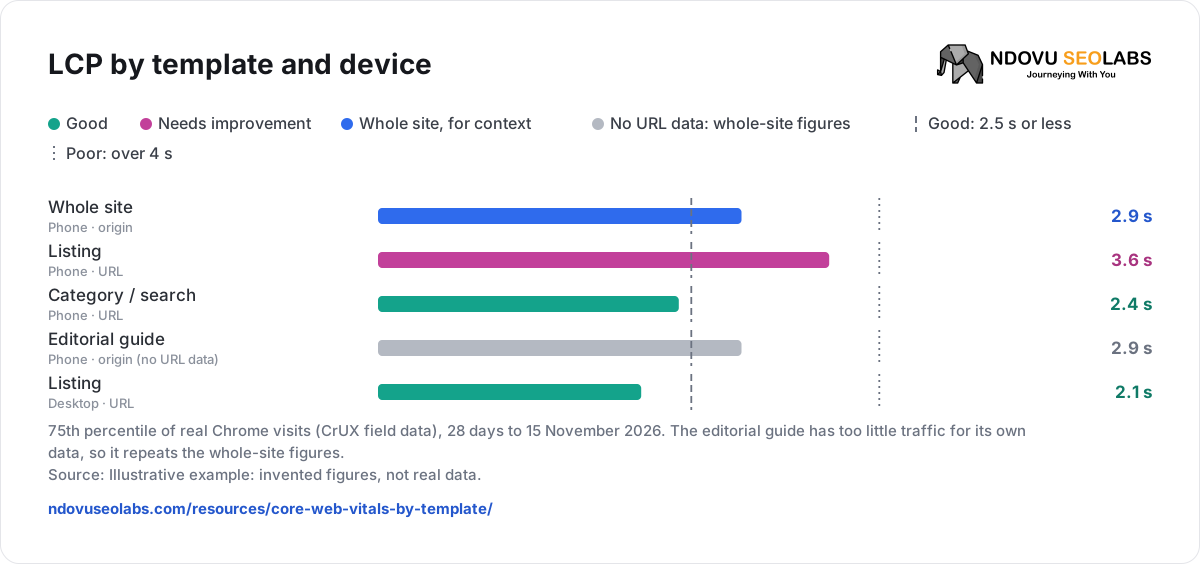
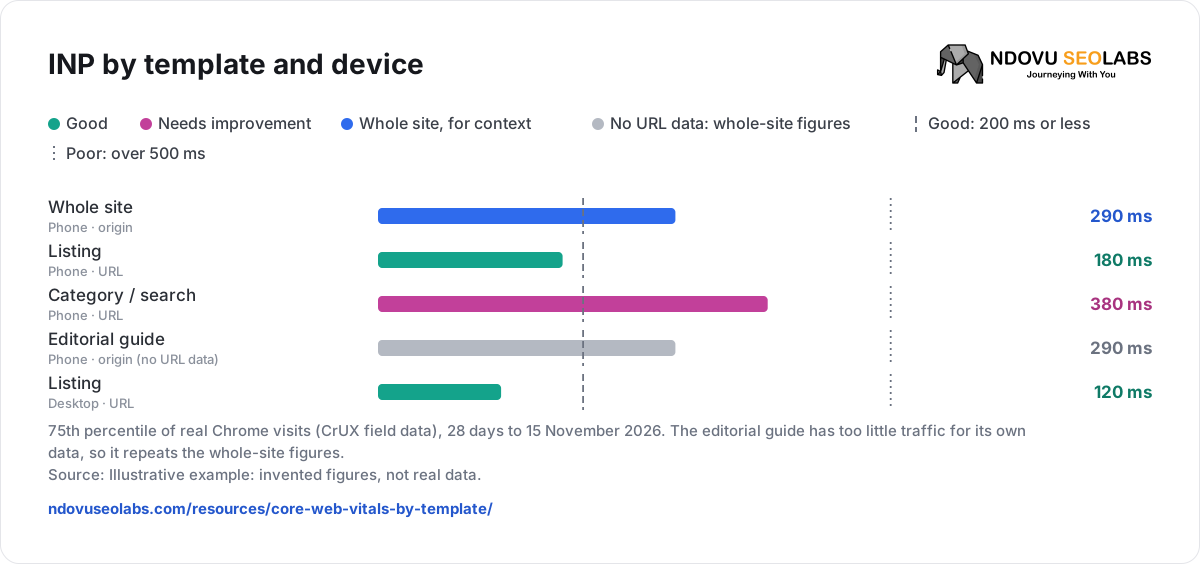
| Listing | Phone | URL | 28 days to 15 Nov | /listing/2-bed-apartment-kilimani-48213/ | 3.6 s · 180 ms · 0.04 | High: 80% of enquiries start here | Lighthouse: when is the first gallery photo found and how heavy is it? |
| Category / search | Phone | URL | 28 days to 15 Nov | /rent/nairobi/apartments/ | 2.4 s · 380 ms · 0.05 | High: most Google clicks land here | Record tapping filters in Chrome DevTools; Lighthouse can’t measure INP. |
| Editorial guide | Phone | Origin (no URL data) | 28 days to 15 Nov | /guides/renting-in-nairobi/ | whole-site figures | Medium: early-stage readers | Lab check only; no field evidence for this template. |
| Listing | Desktop | URL | 28 days to 15 Nov | same URL | 2.1 s · 120 ms · 0.03 | Lower: most visits are on phones | None now. |
LCP by template and device


- Good
- Needs improvement
- Whole site, for context
- No URL data: whole-site figures
- Good: 2.5 s or less
- Poor: over 4 s
75th percentile of real Chrome visits (CrUX field data), 28 days to 15 November 2026. The editorial guide has too little traffic for its own data, so it repeats the whole-site figures.
Source: Illustrative example: invented figures, not real data.
INP by template and device
- Good
- Needs improvement
- Whole site, for context
- No URL data: whole-site figures
- Good: 200 ms or less
- Poor: over 500 ms
75th percentile of real Chrome visits (CrUX field data), 28 days to 15 November 2026. The editorial guide has too little traffic for its own data, so it repeats the whole-site figures.
Source: Illustrative example: invented figures, not real data.
Shared problem: Lighthouse on both the listing and the search page shows long main-thread tasks from the same map script, loaded before anyone opens the map. It sits on two high-value templates and plausibly hurts both LCP and responsiveness.
Decision: load the map only when it is opened, on every template that uses it. Then fix the listing’s first gallery photo for LCP. Leave the guides: their score is the whole site’s, not theirs.
Step 2 · Decide which template goes first
| Weigh | Fix earlier when | Fix later when |
|---|---|---|
| Business importance | Enquiries, sales or most search clicks pass through it. | Few visitors reach it, or they are early researchers. |
| Distance from “good” | It is poor, or the fix is clear and it sits just past the line. | It already passes. |
| Evidence scope | The data is for that URL. | It is origin data standing in for the template. |
| Shared cause | One fix moves several templates. | The cause is unique to a low-value page. |
| Device | It fails on the device most visitors use. | It fails only on the minority device. |
Read it by template in Ndovu
- Open Site Audit → New audit. Turn on Include Lighthouse if you want lab tests too.
- In the finished audit, open Performance. Real-user Core Web Vitals (Chrome UX Report) shows the Whole site, the homepage and one row per template, with a Phone / Desktop toggle.
- Read the Data level column: URL is that page’s own data; Origin (no URL data) repeats the whole-site figures because the page has too little Chrome traffic.
- Below it, Lighthouse lab tests show diagnostics for a sample of templates, if the audit included Lighthouse.
Ndovu picks each template’s page for you: the indexable page with the most Search Console clicks, then inlinks. The section shows the CrUX collection dates, which are independent of when the audit ran. More in Audit settings, views and priorities.
Step 3 · Confirm the fix in field data
- Check the lab result straight after release: it shows whether the change did what you expected.
- Field data is a 28-day rolling window, so a fix shows gradually. Compare the same URL and device after a full 28 days from release.
- Check the scope again. If the URL had its own data before, it should still have it.
- In Search Console’s Core Web Vitals report, Start Tracking on a fixed issue begins a 28-day monitoring session.
A template sheet you can copy
Template:
Device:
Representative URL:
Scope (URL / origin / no data):
Field-data period:
LCP / INP / CLS (75th percentile):
Business importance (enquiries, clicks):
Shared with other templates?:
Next diagnostic step:
Fix released on:
Re-check after (28 days):| When you need to… | Read |
|---|---|
| Run an audit and verify fixes | Run a site audit and verify fixes |
| Check one URL quickly | Core Web Vitals checker |
| Rank the rest of the audit | Prioritise a technical audit |
Sources
- web.dev: Web Vitals
- web.dev: Defining the Core Web Vitals thresholds
- web.dev: Interaction to Next Paint (INP)
- Google: About PageSpeed Insights
- Chrome: CrUX API
- Chrome: CrUX methodology
- Search Console: Core Web Vitals report