

Use Bing’s AI Performance export to pick one grounding query, check the pages it cites, and write a brief with the reader question, format and evidence.
You export Bing’s AI Performance report and get a list of short phrases with citation counts. It is tempting to read them as the questions people typed into Copilot and write a page for each.
They are not those questions. Used carefully, they still tell you which subjects Bing’s AI already uses your site for, and where other sites are cited instead.
The short version. Pick one grounding query that matters to the business, see which of your pages Bing cites for it, then write a brief: the reader question you are answering, the page format, and the evidence the page needs. Judge it later on citations and on visits, separately. Nothing here guarantees a citation.
What the export does and does not tell you
| Field | What Bing says it is | Don’t read it as |
|---|---|---|
| Grounding query | A key phrase the AI used when retrieving content that was cited in an answer. Grouped, generalised phrases (Bing). | The prompt a person typed. Bing says they are not full user questions or prompts. |
| Citations | How often your content was visibly referenced as a source in AI answers in the period. | Clicks, visits or traffic. Bing says plainly they are not. |
| Citation share | Your share of all citations shown for that grounding query (Bing). | A ranking, a traffic share or a quality score. |
| Intent, Topic | Labels from Bing’s classifiers; they can be an imperfect fit. | Facts about the searcher. |
| Opportunity queries | Queries where other sites appear and yours does not, with citation volumes as ranges (Bing). | A precise ledger. Bing calls them directional signals for planning. |
The whole report is a sample of citation activity, so very low activity may not show, and totals can differ between views. It covers Microsoft Copilot, AI summaries in Bing and select partner integrations, nothing else.
Step 1 · Export the report
- In Bing Webmaster Tools, open AI Performance and pick a period: 7 days, 30 days, 3 months or a custom range.
- Use Download all for the grounding queries and for the pages, with no query or page selected.
- In Topics Portfolio, download Top Opportunity Queries. It uses a one-, two- or three-month window.
- Write the period on each file. You will need it to compare later.
Step 2 · Pick one query worth a brief
| Ask | Keep it when | Park it when |
|---|---|---|
| Does it matter to the business? | It sits close to what you sell or advise on. | It brings citations on subjects you can’t serve. |
| Is the topic yours already? | You hold citations on related queries in the same topic. | You have no page anywhere near it. |
| Is your share low on a core query? | You are cited, but others take most of the citations. | Your share is already high and stable. |
| Is it an opportunity query? | Others are cited and you have, or could write, a better answer. | It is a competitor’s brand name. |
| Is the label right? | The Intent and Topic make sense when you read the phrase. | The classifier clearly misread it. |
Step 3 · See which pages are cited for it
In AI Performance, select a grounding query and the view filters to the pages cited for it, with their counts. Select a page instead to see its grounding queries (Bing).
- You can filter by a query or a page, not both at once. Exports follow the filter, so export each view you need.
- The two directions can show different counts for the same pair, because each is sampled over slightly different windows. Bing says this is expected.
- For an opportunity query you are not cited, so there are no pages to inspect. Decide which of your pages ought to answer it, or whether you need a new one.
Then open the cited pages and ask: is the cited page the one you would want cited? Is the answer on it current, clear and supported?
Example: a solar installer in Nairobi
Illustrative example, not real data. An invented solar installer, Jua Power (juapower.example.co.ke), three months of AI Performance data.
The sample record
| Field | Value | Note |
|---|---|---|
| Grounding query | solar water heater sizing | A grouped phrase, not a prompt. |
| Intent | Planning | Bing’s classifier. |
| Topic | Solar Energy | Bing’s classifier. |
| Citations | 46 | Sampled; not visits. |
| Citation share | 8% | Others take most of the citations. |
| Cited pages (query selected) | /blog/solar-water-heater-buying-guide/ 31 · /products/200-litre-solar-water-heater/ 12 · /faq/ 3 | The guide carries it. |
| Related opportunity query | solar water heater for family of four · 50–100 citations to other sites | A range, from Topic Portfolio. |
| Period | 18 Aug – 17 Nov 2026 | Keep for the comparison. |
Pages Bing cites for “solar water heater sizing”


- Carries the query
- Cited for a question it does not answer
- Other
Citations per page with the grounding query selected, 18 Aug – 17 Nov 2026: 46 in all, with each page’s share. Citations are sampled by Bing and are not visits.
Source: Illustrative example: invented figures, not real data.
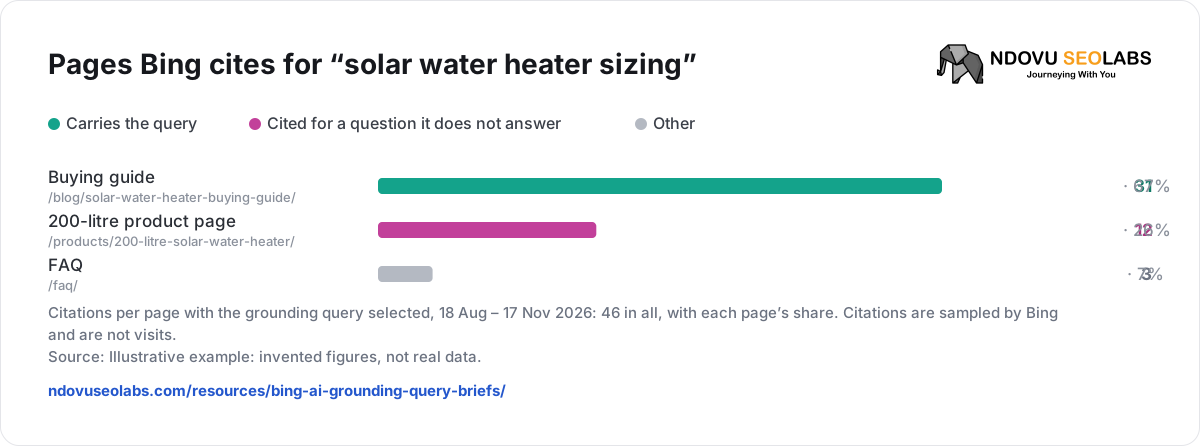
Reading: Bing’s AI already uses the buying guide for sizing, but with a small share, and other sites win the more specific family-size phrase. The guide mentions sizing in one paragraph and gives no table. The product page is cited for a planning question it does not answer.
Decision: update the buying guide rather than write a new page, so two pages do not compete. Add a sizing section with a table, and link to it from the product page.
Step 4 · Write the brief
Write the reader question as your own hypothesis. Check it against real questions from customers, sales calls and Search Console queries before you commit.
| Brief field | For Jua Power |
|---|---|
| Reader question | What size of solar water heater does my household need? |
| Who asks it | Homeowners planning a purchase, often comparing tank sizes and prices. |
| Page | Update /blog/solar-water-heater-buying-guide/ with a new “Choosing the size” section. |
| Format | A short answer first, then a table: household size → tank size, with the assumptions. Bing suggests step-by-step guidance for Planning intent. |
| Evidence needed | Litres per person from your own installs, the manufacturer’s specification sheets, a dated price range in KES, a photo of a fitted 200-litre unit. |
| What not to add | Claims you cannot support, such as savings figures without a source. |
| Links | From the product page’s description to the new section, and back from the section to the products. |
| Measure | Citations and citation share for the query and the page, same-length period; Bing clicks to the guide. |
Bing’s own guidance is general: align with intent, add depth, use clear structure and tables, support claims with evidence, and keep content current (Bing). It does not promise that any of it leads to a citation.
Grounding query (as exported):
Intent / Topic (Bing labels):
Citations / Citation share / period:
Cited pages for this query:
Related opportunity queries (ranges):
Reader question (our hypothesis):
Checked against (customer questions, Search Console):
Page to update, or new page:
Format:
Evidence needed:
What not to add:
Internal links:
Published on:
Compare on (same period length):
Keep the exports in Ndovu
Bing offers AI Performance only as downloads, with no API, so Ndovu imports the files. Open AI Visibility → Prompt Tracking, scroll to Microsoft Copilot & Bing AI citations, choose the file under AI Performance CSV, enter the Period you picked in Bing and click Import.
- Grounding queries shows each query with Intent, Topic, Citations and Citation share; Topics & intent groups them.
- Opportunity queries and Topic portfolio hold the Topic Portfolio downloads.
- With Bing connected, Search without citations lists pages with at least 100 Bing impressions in the last three months and at most one AI citation: pages Bing shows in search that its AI rarely cites.
- Import the unfiltered files. Ndovu shows the newest upload of each kind, so a filtered pages export would replace the full list.
Steps and file types are in Import Bing AI Performance data.
Step 5 · Check what changed
- Make sure Bing has the updated page: AI Performance only reflects content eligible for indexing. IndexNow tells Bing it changed.
- After a few weeks, export the same views for a period of the same length and compare the query’s citations and citation share, and the page’s grounding queries. Bing’s Compare overlays the previous period.
- Treat a change as observation, not proof. Bing says trends cannot be attributed to a single update, and demand and model changes move them too.
- Check visits separately, in Bing’s search report and your analytics. A citation is not a visit.
| When you need to… | Read |
|---|---|
| Import the AI Performance files | Import Bing AI Performance data |
| Keep mentions, citations and visits apart | AI mentions, citations and visits |
| Track answers in other AI assistants | Track your brand in AI answers |
Sources
- Bing Webmaster Tools: AI Performance
- Bing: Introducing AI Performance in Bing Webmaster Tools
- Bing: Intents, Topics, Citation Share and Compare
- Bing: Introducing Topics Portfolio (Beta)