

Task guide
Track keyword rankings
Add a domain, choose devices, schedule and depth, read the tracker and see why rankings move.
When you finish
A domain is tracked for your keywords on a schedule, with competitors, and you can see why a ranking moved.
Before you start
- Rank tracking is on paid plans; daily checks need Pro or higher. Your plan’s keyword pool is shared by all projects: a keyword counts seven times on a daily tracker, twice on both devices and twice past the top 50. See plan limits.
- Costs in the dialog are shown in US dollars; on-demand checks come out of your research allowance in KES.
Add a domain
Sidebar → Performance → Rank Tracking → Add Domain.
Enter the Target Domain, Country, Search Targeting (National, or Local with a city) and Language.
Choose Devices (Mobile only by default), Schedule (Daily, Weekly, Monthly (end of month) or Manual only) and Search Depth (1–10 pages; 4 by default).
Check the cost box (“up to $… per keyword per check”), then click Add Domain.
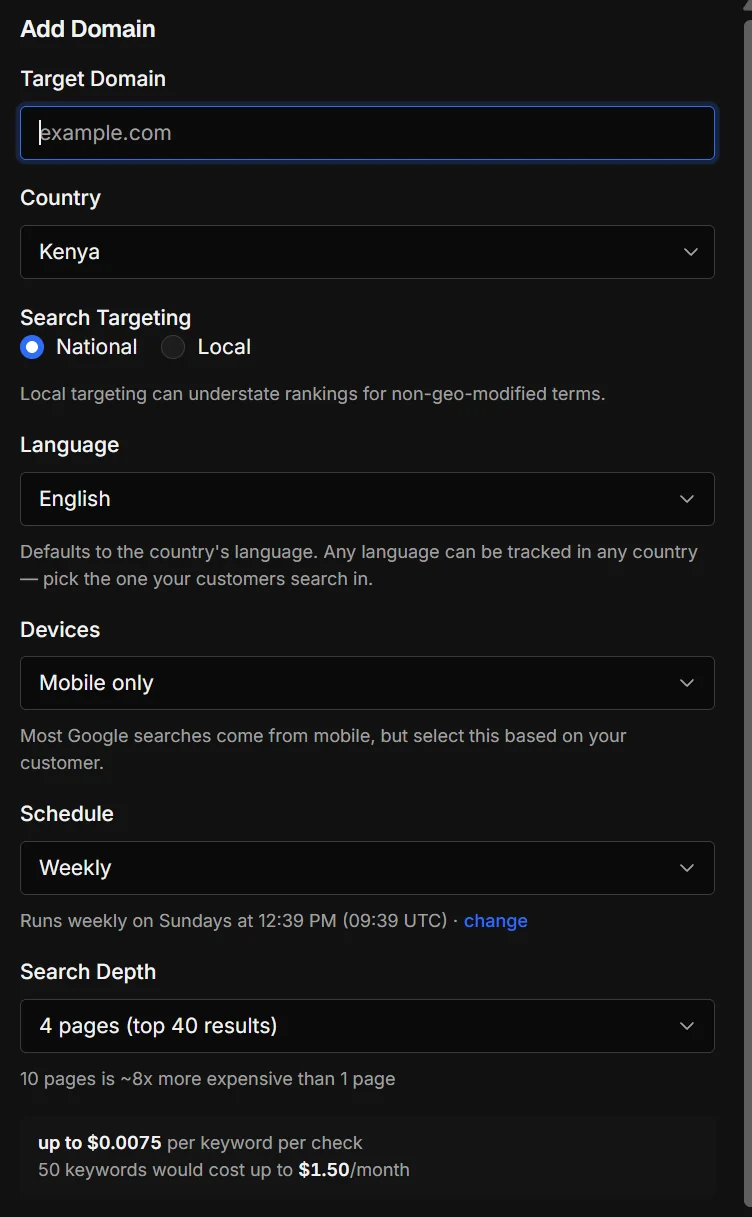
Add Domain, with the cost shown before you save.
What happens next
- Up to 30 keywords are added for you: from Search Console first for your own site, then from ranking data.
- Up to 5 organic competitors are added.
- A first check runs straight away. These lookups use your research allowance.
- You see Tracking your top N keywords against M competitors.
Read the tracker
- Tiles
- Tracked keywords, Avg. position, Visibility, Top 3, Top 10, Winners and Losers.
- Position
- Old → new for the comparison period (vs yesterday, last week, last month or 90 days ago). “lost” means it dropped out of the depth you track.
- SERP features
- FS (featured snippet), PAA, AI (AI Overview), Local, KP, Video, Shorts, Forums, Reviews, Img, Shop, News.
- Why did it move?
- Click the magnifier: likely or possible causes from rank checks, Google updates, site events, your notes, competitors, the results page and Search Console. Dates that line up are leads, not proof.
- Competitor comparison
- Visibility, top 10 and how often each beats you. Following a competitor costs nothing extra.
Views: Latest, History, By page and Before / after. Filter with Refine results; export with Export to Sheets or Export CSV. Import from… brings history from SE Ranking, ProRankTracker, AccuRanker, Semrush or any CSV.
Check now and costs
- Check rankings (in the … menu) runs now and uses your research allowance. With 50 or more keywords it asks first and shows the cost.
- Scheduled checks are covered by your plan and don’t use the allowance.
- Daily checks cost seven times weekly; both devices cost twice; 10 pages cost about 8× one page.
If something goes wrong
The section is read-only
On Free, rank tracking keeps your data but runs no checks. Choose a plan to restart.
It says my plan tracks up to N keywords
Remove keywords, use a weekly schedule or one device, or upgrade.
A scheduled check was skipped
The list row says why: paid plan required, over your plan’s limits, or out of credits. See Rank checks stopped.
It says it’s double-checking results
Google sometimes serves rank trackers incomplete results, so some checks are retried. This can take up to 3 hours.